
Team and account
The activity log
See who did what across your organisation, filter the log by person, client, action and date, and choose which events it shows.
The activity log is a running record of what happens in your organisation: sign-ins, invites, clients added or edited, posts created and approved, and more. Admins open it from Activity in the workspace sidebar (under Settings). Staff don't see it.
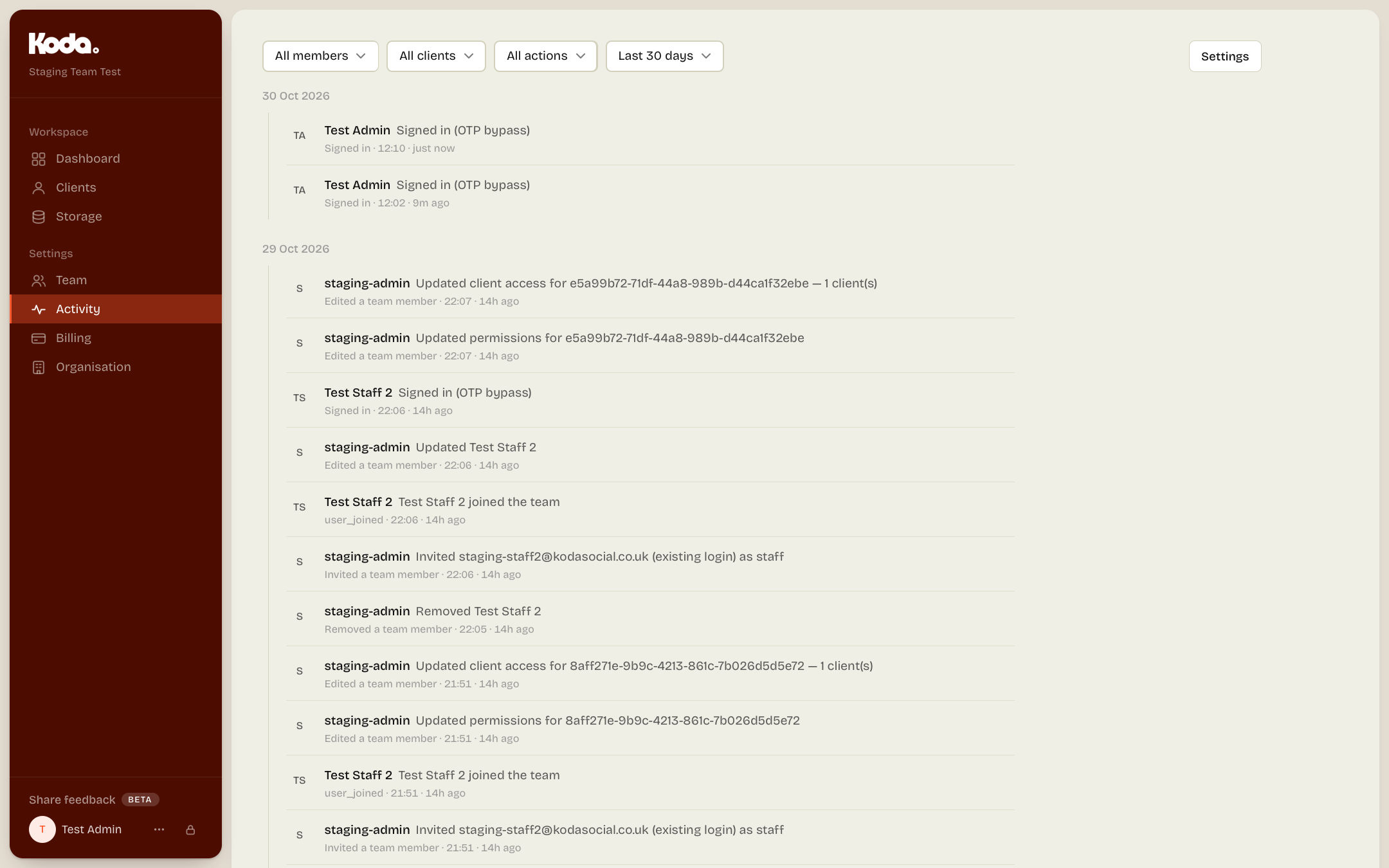
Reading the log
Entries are grouped by day, newest first. Each one shows who did it, what happened, the client it relates to, and the time. Some entries are made by Koda itself, such as a notification being sent.
The log loads 100 entries at a time. Click Load more at the bottom to see older ones.
Filter the log
Use the four filters at the top:
- All members: pick one person to see only what they did.
- All clients: pick one client.
- All actions: pick one type of event, such as Signed in, Invited a team member, Added a client or Created a post.
- Last 30 days: change to Last 7 days, Last 90 days or All time.
Choose what appears
Click Settings to open Activity log settings. Untick any event types you don't want in the feed, such as sign-ins, then click Save. This applies to everyone who views the log.
Koda still records everything in the background. If you tick an event type again later, its past entries come back.
Still stuck? Email [email protected] and we'll help.