
Inbox
Reply to DMs
Answer Instagram and Messenger DMs from Koda, send photos, use saved replies and AI drafts, and understand the 7-day reply window.
You can reply to Instagram and Facebook Messenger DMs straight from the inbox. Replies go out from the client's own account, exactly as if you'd typed them in the Instagram app.
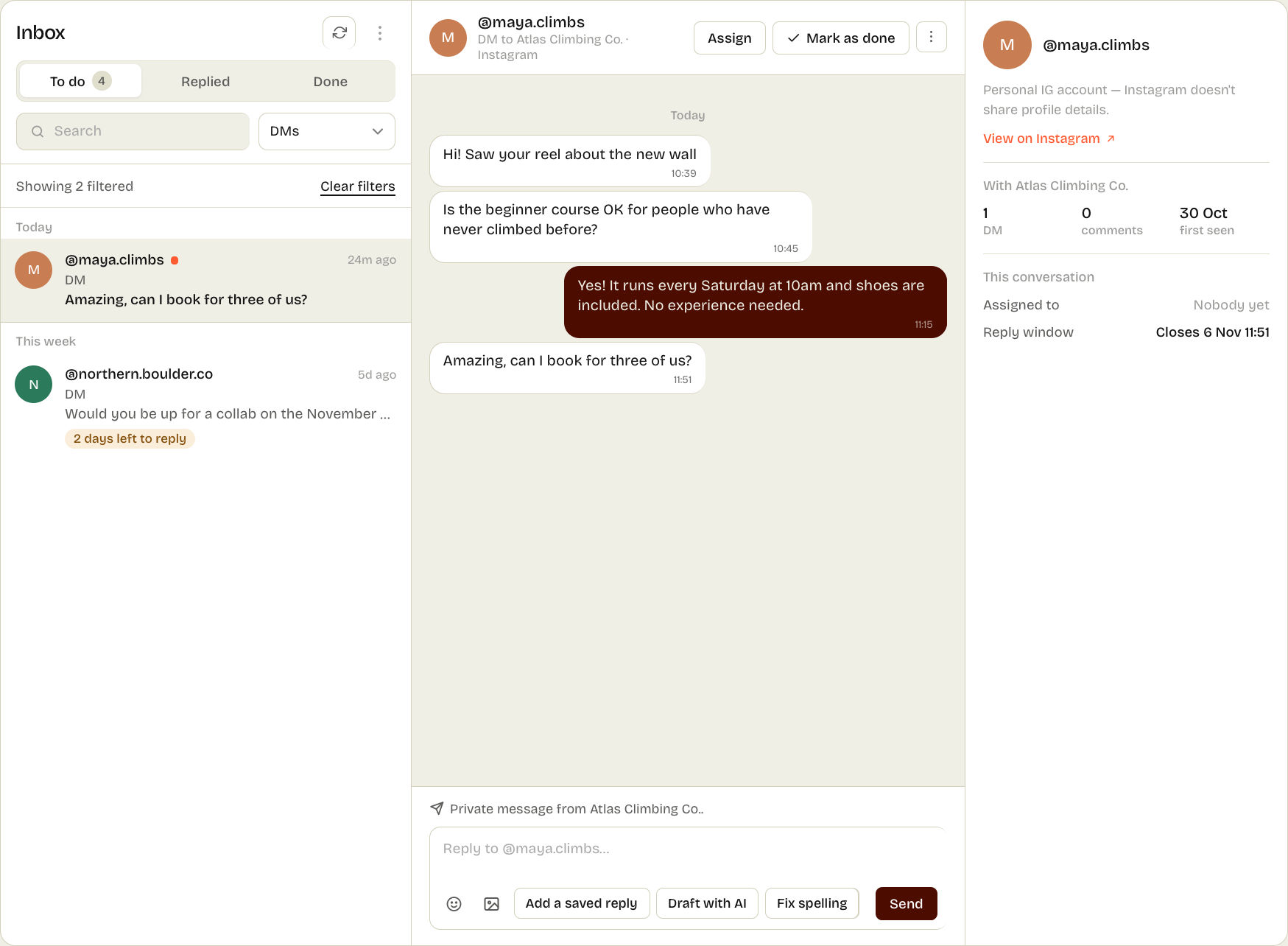
Send a reply
- Open Inbox (under Daily in the client sidebar) and click a conversation.
- Type in the box at the bottom.
- Press Enter or click Send. Use Shift and Enter for a new line.
Your message appears in the thread straight away, slightly faded, and turns solid once Instagram or Messenger confirms it. If it fails, Koda takes it back out of the thread, puts your text back in the box and shows the error.
While you type, the person sees the typing indicator in their app. When they've read your reply, Seen appears under your last message.
The 7-day reply window
Instagram and Messenger only let businesses reply for a limited time after the person's last message. Koda handles this for you:
- In the first 24 hours, replies go out as normal messages.
- From 24 hours to 7 days, Koda sends them with Meta's human agent tag. This is Meta's rule for replies typed by a real person, and it's what lets you answer up to 7 days later.
- After 7 days, the reply box is replaced by a note that the reply window has closed. For Instagram there's a Reply in Instagram ↗ link. For Messenger, the person needs to message the Page again first.
When a window has 48 hours or less to go, the conversation shows a tag such as 2 days left to reply, and the note above the reply box tells you the exact closing time. The right-hand panel also shows it under Reply window.
Send a photo
Click the photo button (Add photo) beside the reply box and choose a JPG, PNG or GIF up to 8MB. It shows above the box while it uploads. You can add text too: the photo is sent first, then your message. Photos work on Instagram and Messenger, within the same reply window.
Saved replies, emoji and AI help
- Saved replies: short answers you send often, such as a booking link. Click Add a saved reply (or Edit saved replies from the list) to give one a name and the reply text. Saved replies are shared across your whole team and every client.
- Add emoji: opens the emoji picker.
- Draft with AI: writes a reply in the client's voice using their brand profile and the conversation so far. It's marked "AI draft. Read it before sending." It won't invent prices or availability, so check and edit before you send.
- Fix spelling: tidies spelling, grammar and punctuation in what you've typed without rewording it.
Like a message
Double-click (or double-tap on a phone) one of the person's messages to heart it, as you would in Instagram. Tap it again twice to remove the heart. Messenger doesn't allow this through Meta's tools, so it only works on Instagram DMs.
Still stuck? Email [email protected] and we'll help.