
Getting started
The dashboard
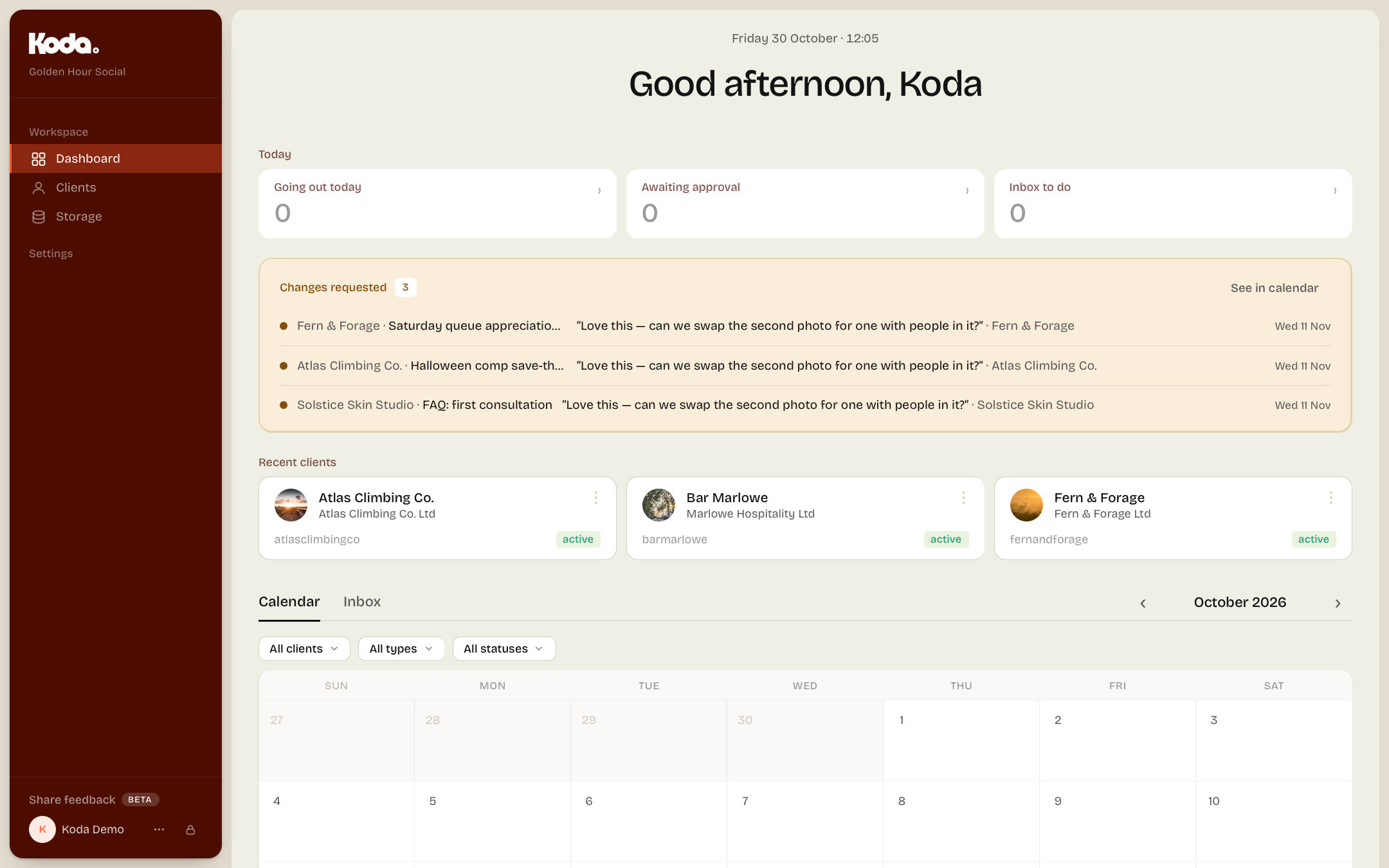
What the workspace Dashboard shows: today's numbers, changes your clients have asked for, recent clients, and a combined calendar and inbox across every client.
The Dashboard is your daily snapshot across every client. Open it from the top of the workspace sidebar. It's also where Koda lands when you sign in.
Today
Three numbers sit under the greeting. Click any of them to jump to the detail.
- Going out today: posts scheduled for today across all your clients. Clicking it opens today on the calendar below.
- Awaiting approval: posts on the calendar month shown below that are waiting on a client. Clicking it filters the calendar to those posts.
- Inbox to do: Instagram comments and DMs that still need a reply. Clicking it opens the Inbox tab.
Changes requested
When a client asks for changes on a post, it appears in a Changes requested card with the client's comment and the post's date. Click a row to open the post. Click Mark as addressed once you've dealt with it, or See in calendar to see all of them on the calendar. On a phone, swipe a row left to mark it as addressed.
The card only shows when there's something in it.
Recent clients
Recent clients shows the three clients you opened most recently. Hover a card to see whether anything is waiting, such as posts awaiting approval or unread messages, or All clear. If you haven't added a client yet, you'll see a + Add client tile here instead.
Calendar and Inbox tabs
The bottom half of the dashboard has two tabs.
Calendar shows every client's posts on one month grid, colour-coded by client. Use the arrows to change month, and the three filters to narrow it down by client, by content type (Static, Carousel, Reel or Story) and by status (such as Draft, Awaiting approval, Needs changes, Scheduled, Published or Failed). Your client filter is remembered on that device. Click a post to jump into that client's calendar for that month.
Inbox gathers the Instagram comments and DMs from every connected client into one list, so you can work through them without opening each client.
Still stuck? Email [email protected] and we'll help.