
Connecting accounts
Connect Instagram
The two ways to connect a client's Instagram, Instagram login or Facebook login, and what each one gives you.
Koda can connect Instagram in two ways. Both need the Instagram account to be a Business or Creator account. Pick the route that fits how the client's accounts are set up.
Which route to choose
| Instagram login | Facebook login | |
|---|---|---|
| Start from | The Instagram row | The Facebook row |
| Needs a Facebook Page | No | Yes, linked to the Instagram |
| Publishing, analytics, comments | Yes | Yes |
| Instagram DMs | Yes | Needs one extra Instagram login step |
| Facebook Page posting and analytics | No | Yes, connected in the same go |
| Adding audio to Reels | No | Yes |
| Tagged posts in Listening | No | Yes |
If the client only cares about Instagram, or has no Facebook Page, use Instagram login. If they post to a Facebook Page too, use Facebook login so both platforms connect as one brand.
Connect with Instagram login
- Open Integrations (under Setup in the client sidebar).
- On the Instagram row, click Connect.
- Choose I'll log in for them, then click Open Instagram. To have the client do it instead, choose My client connects (see client connect links).
- Log in and approve Koda. The row switches to Connected with "connected with Instagram login".
Connect with Facebook login
This route goes through the Facebook Page that the Instagram account is linked to. You need to be an admin of that Page on Facebook. The steps are in Connect Facebook: pick the Page and click Connect both.
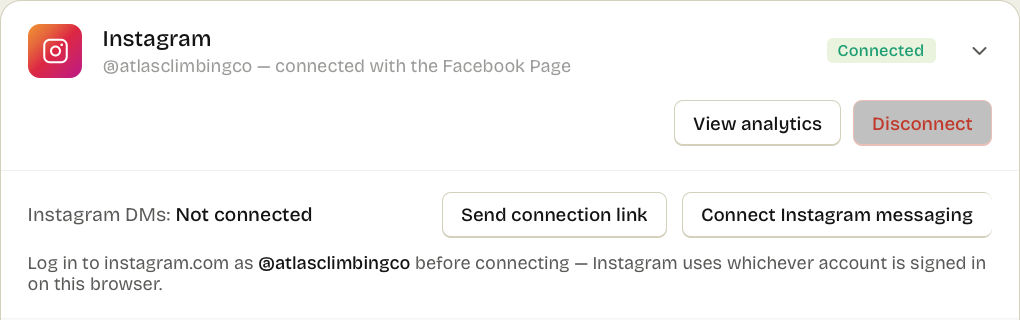
Facebook login doesn't cover DMs, so Koda then shows a "One more step" page. Click Continue to Instagram to log in with Instagram and switch on messages, or Skip for now and do it later.
To add DMs later, open the Instagram row on Integrations. Under Instagram DMs, click Connect Instagram messaging, or Send connection link to have the client do it.
Good to know
- Koda can't connect personal Instagram accounts. Switch it to a Business or Creator account in the Instagram app first.
- Instagram only lets you reply to a DM within 7 days of the person's last message. See Inbox.
- If a Facebook-login connection breaks but the client also has Instagram login, Koda keeps publishing through Instagram login until Facebook is reconnected.
Still stuck? Email [email protected] and we'll help.