
Planning and publishing
Fix publishing errors
What a failed post looks like in Koda, how automatic retries and alerts work, the most common causes and how to retry a post safely.
Occasionally a post doesn't go out, usually because a connection has expired or a platform couldn't process the media. Koda tells you which platform failed and why, and most posts go out on a retry.
How you'll know
- Calendar: the post turns red and its status reads Failed, or "Failed on Instagram" (or whichever platform) if only some platforms failed.
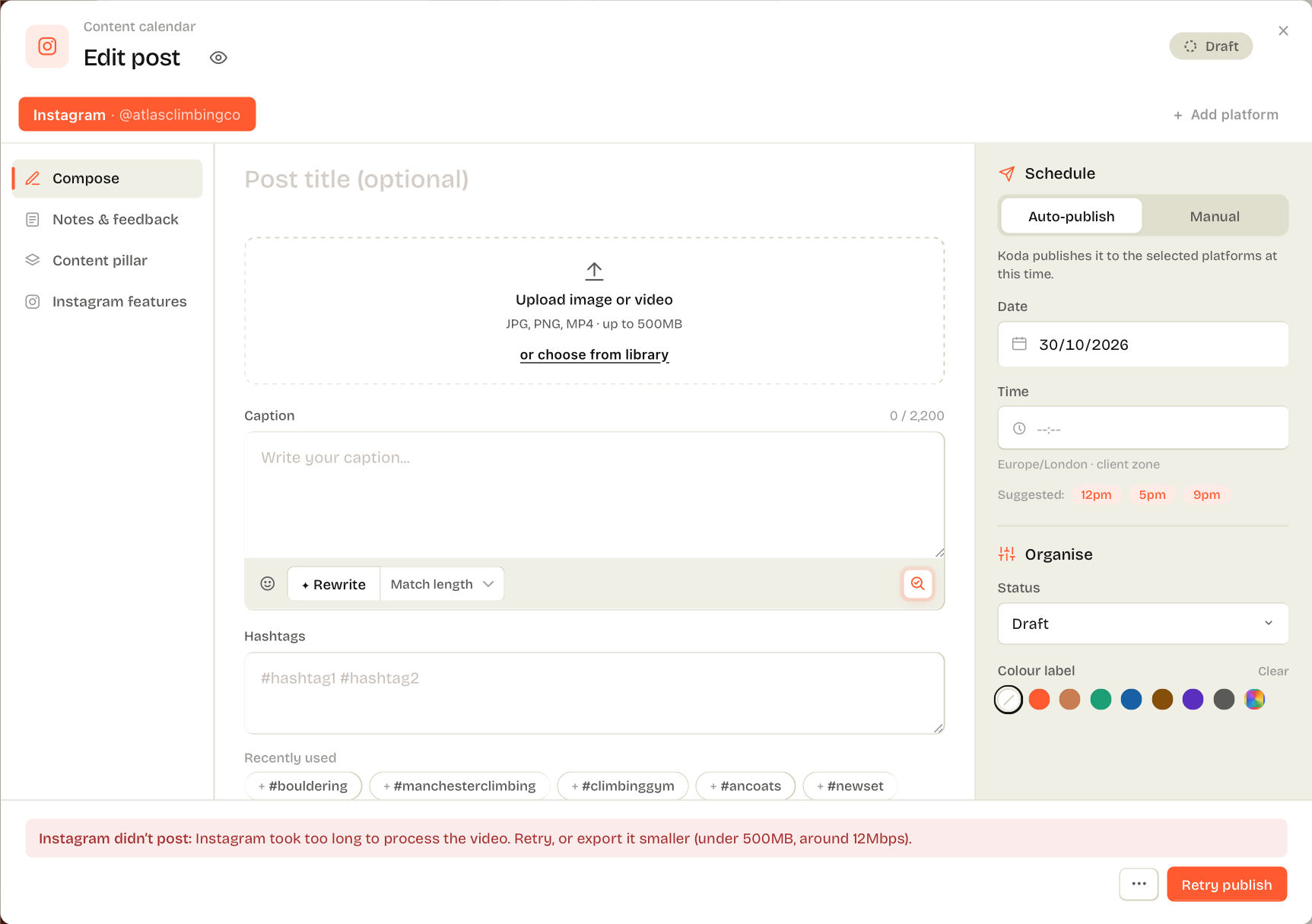
- Composer: the footer explains what went wrong for each platform, for example "Instagram didn't post", and lists any platforms where it's already live.
- Scheduler tab: the post appears under Failed with the reason. See The Scheduler tab.
- Email: workspace admins and the team member who created the post get an email. If the problem is a connection, the email says the account needs reconnecting.
- Push: admins can get a "Publish failed" notification on the Koda iPhone app.
Automatic retries
If a platform fails at the scheduled time, Koda tries again on its own, up to five attempts in total, leaving longer gaps each time (5 minutes, 30 minutes, 2 hours, then 6 hours). The email goes out after the second failed attempt, so you hear about it quickly.
Koda doesn't retry when retrying can't help: a platform that's no longer connected, a video that's too big, or an overdue payment. Fix the cause first.
Common causes and fixes
| What Koda says | What to do |
|---|---|
| Koda has lost access to this Facebook Page, or can't reach this account any more | Reconnect it in Integrations. For Facebook, keep the Page ticked when Facebook asks which Pages to share. See Reconnect accounts |
| Not posted: Instagram isn't connected any more | The account was disconnected after you scheduled. Reconnect it, then schedule again |
| Instagram took too long to process the video | Retry, or export the video smaller (under 500MB, around 12Mbps) |
| Instagram couldn't fetch the media | Retry. If it fails again, re-upload the file |
| One of the tagged or collaborator accounts can't be found | Check the usernames under Instagram features, remove any that are wrong, then retry |
| This Instagram account can't post trial reels yet | Turn off Share as trial reel and publish again |
| The platform had a temporary problem on their side | Retry. This usually works |
| Not published: your Koda payment is overdue | Pay the invoice under Billing, then reschedule the post |
Video size
Keep videos under 500MB for Instagram, Facebook, TikTok and LinkedIn. Instagram has stalled on larger files, so the composer shows a warning on any video over 500MB, and Koda won't send one to those platforms. Only YouTube takes larger videos, up to 2GB. If a video is big, export it again at around 12Mbps; it will look the same on a phone.
Retry a failed post
Open the post and use the button in the footer, or click Retry publish in the Scheduler.
- Retry publish posts it again straight away.
- On a post that was scheduled, the footer button is Re-activate publishing. It puts the post back to a draft so you can fix it, then Schedule it for a new time or choose Post now.
Retrying only sends the post to the platforms that failed. Platforms where it's already live are skipped, so nothing is posted twice.
Still stuck? Email [email protected] and we'll help.