
Connecting accounts
Connect LinkedIn
Connect a client's LinkedIn personal profile, company Page or both, and what Page admin roles mean for posting and analytics.
LinkedIn has two kinds of connection in Koda. A personal profile posts as the person. A company Page posts as the business. You can connect one or both for each client.
Connect a profile or Page
- Open Integrations (under Setup in the client sidebar).
- On the LinkedIn row, click Connect.
- Choose I'll log in for them, then click Choose profile or Page. To have the client do it, choose My client connects and see client connect links.
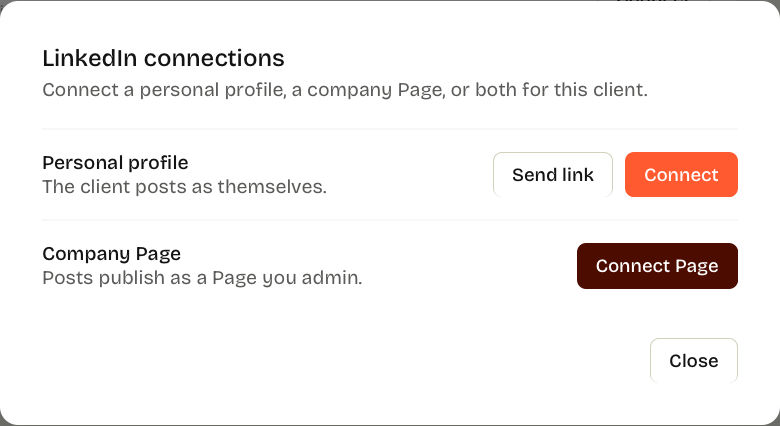
- The LinkedIn connections window opens. For a profile, click Connect on the Personal profile row and log in as the person who'll post. For a Page, click Connect Page on the Company Page row and log in as someone who admins the Page.
- Approve Koda on LinkedIn. You come back to Koda with a "Connected" message.
If the LinkedIn login admins more than one Page, Koda asks you to choose the company Page for this client.
Once something's connected, the LinkedIn row shows a Manage button. Use it to reconnect, disconnect or add the other connection.
Page admin roles
LinkedIn decides what Koda can do based on the role of the person who connected the Page:
| Role on the Page | Post as the Page | Page analytics |
|---|---|---|
| Super admin | Yes | Yes |
| Content admin | Yes | No |
With a Content admin connection, posting works but Analytics shows "LinkedIn only shares Page stats with Super admins", and impressions, engagement and follower growth aren't available. To fix it, the client makes that person a Super admin on the Page (Settings, then Manage admins), then you reconnect the Page.
If the login isn't a Super admin or Content admin of any Page, Koda shows "No Pages found" and nothing is connected.
Posting with both connected
When a client has both a profile and a Page, the LinkedIn tab of a post shows Post as with Page, Profile and Both. Both sends two separate posts with the same caption and media. It starts on Page.
For profile analytics, LinkedIn only shares posts published through Koda, not the profile's other posts.
LinkedIn connections expire
LinkedIn connections last about 60 days and can't renew themselves. In the last 10 days, the LinkedIn connections window shows "Connection expires in" and the number of days. Click Reconnect on that row before it runs out, or posts stop going out. See reconnecting accounts.
Still stuck? Email [email protected] and we'll help.